Delete your account
Close your account for good, what stops it, and what goes with it.
Deleting your account removes your profile, signs you out everywhere, and takes you off every organiser. It can't be undone.
Go to Settings. Profile opens first, with Delete account at the foot. Anything that stops your account being deleted is said there, before any code is sent.
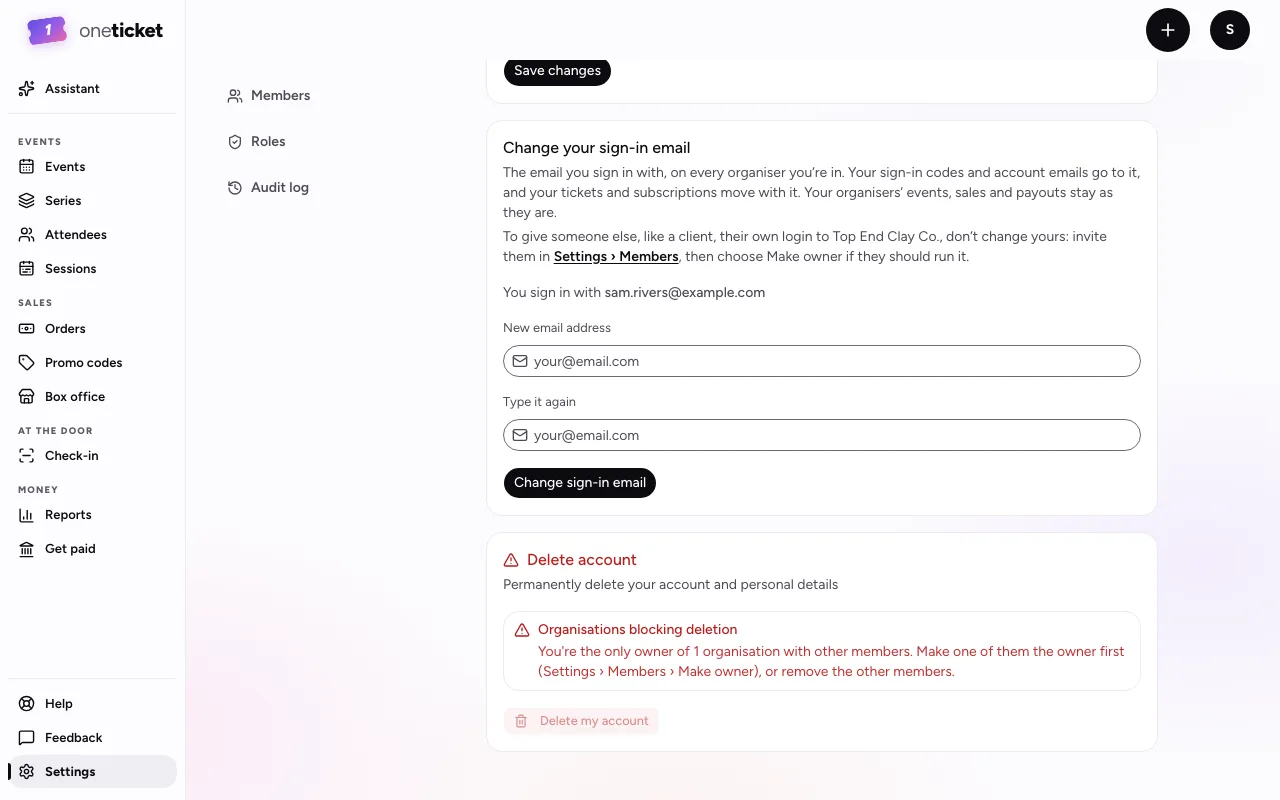
What stops it
- An organiser with sales or billing on record. If you're the only member of an organiser with ticket orders, series subscriptions, a paid plan or payouts, the page says "This account can't be deleted here" and lists what each one has. We have to keep those records, so we close the organiser and your account for you: choose Contact support. See Delete or close an organiser.
- An organiser with other people on it. If you're its only owner, make one of them an owner, or remove them, first. See Your team.
- An active subscription. Cancel it first.
What goes with it
An organiser where you're the only member, with no sales or billing on record, is deleted with your account, with its events. The page lists each one under Deleted with your account, with how many events it has.
An organiser with other members carries on without you.
Tickets and orders you've bought aren't deleted: they stay with their organisers, for their records (who came, what was paid). Your account, profile and sign-in details go.
Delete it
- Under Delete account, choose Delete my account.
- Read what will be deleted. If you sign in with a password, type it.
- Choose Delete my account. We email you a 6-digit code. It works for one hour.
- Type the code under 6-digit code and choose Confirm deletion. You're signed out, and a page confirms your account is deleted.
If the code is wrong or has expired, the page says so: check the latest email, or choose Send a new code. After 5 wrong tries the code stops working, and a new one is needed.
Want a copy of your data, or something deleted without closing your account? Write to us from Support. See our Privacy Policy.
Still stuck? Contact support and a person will get back to you.