Block a buyer
Stop someone booking your events, and unblock them later.
Blocking stops an email address booking your events, now and in future, including as a guest on someone else's order. They can't join a waitlist either, and anyone already in line isn't offered a place.
Block someone
- On Orders, open the order's menu (⋮) and choose Block buyer. (On Attendees, a person's menu has Block.)
- Under Who to block, tick the person or people on the order.
- Under Ticket types, choose This order (that ticket type only) or All ticket types.
- Optionally change What they are told when they try to book.
- Optionally note a Reason. Only you see it.
- Choose Block.
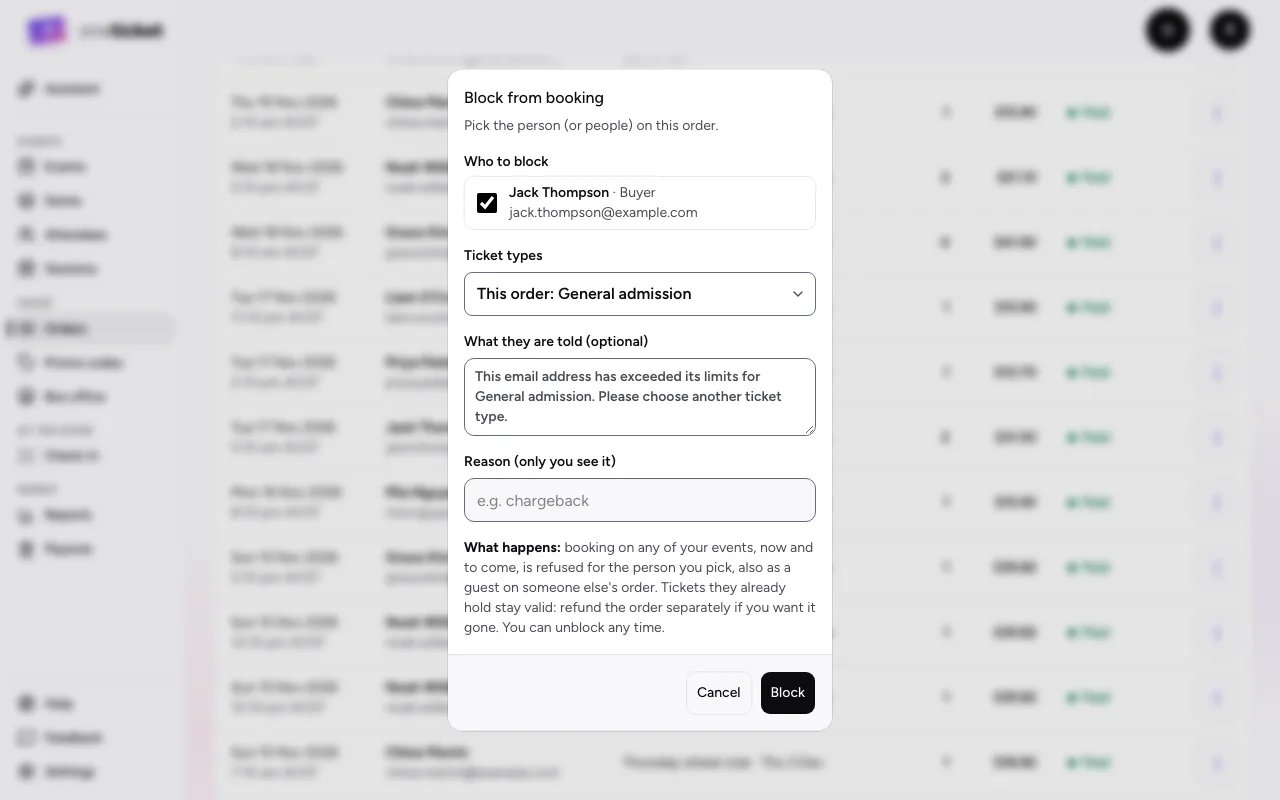
Tickets they already hold stay valid. To take those away too, refund the order. You can't block someone on your own team.
Someone who tells One Ticket they didn't make a booking (Didn't book this? in their email) is also stopped from getting your emails, without you doing anything. See Didn't book this?.
Unblock someone
- On Orders, open the ⋯ menu at the top right and choose Blocked buyers.
- Find them: the list narrows as you type in Search blocked buyers, by email, ticket type or reason.
- Choose Unblock. They can book again.
Still stuck? Contact support and a person will get back to you.