Manage a subscription
Pause, resume, change your plan, update your card or cancel a series subscription, and how a term pass works.
When you subscribe to a series, each session's ticket is made for you before it runs, and emailed to you.
You pay for your first period when you subscribe, and that payment covers your first session. If the series hasn't started yet, your next payment comes after your first session, not before it.
Subscribe
- On the series' page, find Subscribe to this series. It shows the lowest price a ticket works out at, such as "From $4.88 per ticket + booking fee".
- Under Who is this for?, choose who it covers, and under Choose your billing (Choose how to pay when there are term passes too), how often you pay. Each choice says roughly what a ticket costs ("about $4.88 a ticket").
- If the organiser offers replays, tick Add replays to get the recording of every session yours covers, sent after each one.
- Choose Subscribe and pay on Stripe's secure checkout.
A term pass
Some series sell a term pass: one payment for set dates, such as Term 1 2027, instead of paying each week or month.
- On the subscribe page, choose who it's for, then pick the term under Choose how to pay. Each says its price for the term and its dates.
- If the pass offers replays, tick Add replays (a price a person, for the term). A pass that includes them says Replays included, with nothing to tick. Once a limited number have gone, it says Replays are full, and you can still buy the pass without them.
- Choose Buy term pass and pay once on Stripe's secure checkout. The page says what you're charged, once, and that nothing more is charged.
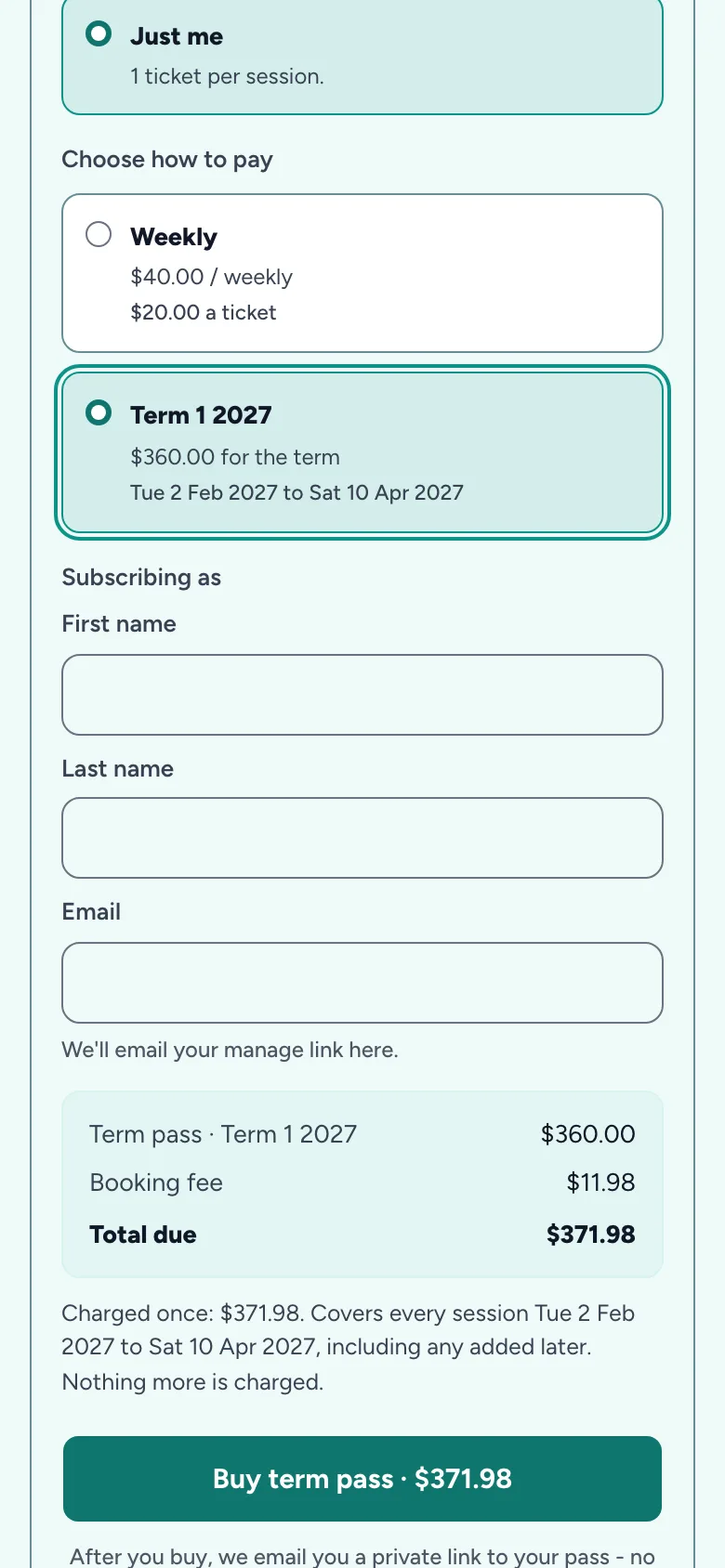
Your pass covers every session in its dates, including sessions the organiser adds later (while places last). Each session's tickets are emailed to you before it starts. If one of the term's sessions is already full for the people you chose, the pass can't be bought: the page says which day, so try fewer people or another option.
There's nothing to pause or cancel: about a week before its last day you're emailed that it's ending, and after that day it ends by itself. My subscriptions and your manage link show it as "Term pass ·" its name and dates, "Paid once". To get money back, ask the organiser: only they can refund a term pass.
You can hold a plan, or term passes for different dates (Term 1 and Term 2), but not both, and not two for the same days. Try to buy another and we email you the link to the one you have.
Weeks without a session
If the organiser skips a week, such as a holiday, you're emailed "No payment for the week of" that week. You're not charged for it: on a weekly plan that week's payment isn't taken, and on a longer plan your next payment moves a week later. The email says the new date. The subscribe page also notes a week coming up with no session.
If a session is already full when your subscription reaches it, there's no ticket for you to that one, and you're emailed that it's full. The email says whether you're charged for that week: if not, your next payment moves on, and it gives the new date; if you paid for it, ask the organiser.
Find your subscription
- Use the private link we emailed when you subscribed. No account needed.
- Or sign in and go to My subscriptions (from My tickets).
Booking a session yourself
If you book a session of the series with the email you subscribed with, we tell you before you pay that your ticket comes with your subscription. Choose View my subscription ticket to sign in and open it, or Buying for someone else? Continue to checkout to book as usual.
Some organisers give their subscription a name of their own, such as Term pass or Membership. You then see that name wherever the series talks about your subscription: on its pages, your tickets, the manage page and its emails (View my term pass ticket, for example).
What you can do
- Pause billing: billing stops for now. Sessions you've already paid for still get their tickets. Choose Resume billing to start again.
- Manage billing: update your card or see your payments.
- Cancel at period end: no further charges. It ends at the end of the period you've paid for, and you keep your tickets until then. If it covers other people, we email them when it ends to say their place has ended.
- Fix payment: if a payment failed, update your card and it's tried again straight away. New tickets wait until it goes through.
- Change plan: change how often you pay, who it covers or where you attend. See below.
Change your plan
- Open your subscription and choose Change plan. You'll sign in with the email you subscribed with, as a change can charge your card.
- Choose How often you pay, Who it covers and, if the series asks, Where you attend. Add a name and email for everyone else it covers.
- The new price shows as you choose, and when you'd pay it:
- Costs more, or covers more people: the difference for the rest of this period is charged today.
- Costs less: nothing to pay today. The new price starts at your next payment, and nothing is refunded for this period.
- Changes how often you pay: your billing period starts again today. The new plan is charged today, less what's left of the period you've already paid for, and your renewal date moves.
- Choose Review change to see the exact amount, then confirm.
If your card is declined, nothing changes. If the plan covers fewer people, or you name someone else in a person's place, tickets already issued to anyone no longer covered stop working for upcoming sessions, and we email them to say their place has ended. We email you the new plan.
You can change who a subscription covers up to five times a day (across all your subscriptions).
You can't change a plan that's paused, set to end or waiting on a payment: resume it, keep it or update your card first.
If the organiser changes your subscription's email, we email the address it had before, with a link to confirm the change. Until it's confirmed, nothing can charge the card from the new address: no dearer plan, no restarting billing and no card changes. If you didn't ask for the change, don't confirm it, and contact the organiser.
If your organiser set your subscription to end, only they can undo that.
If your card is declined, One Ticket emails you ("Your payment did not go through") with the link to update your card. Your tickets are issued as soon as a payment goes through.
If someone else pays for your plan, they manage its billing; you still get your tickets.
Lost the link? Go to oneticket.com.au/subscription, type the email you subscribed with and choose Email me a manage link.
Still stuck? Contact support and a person will get back to you.