Refund an order
Give the money back: the whole order, some tickets or extras, or an amount.
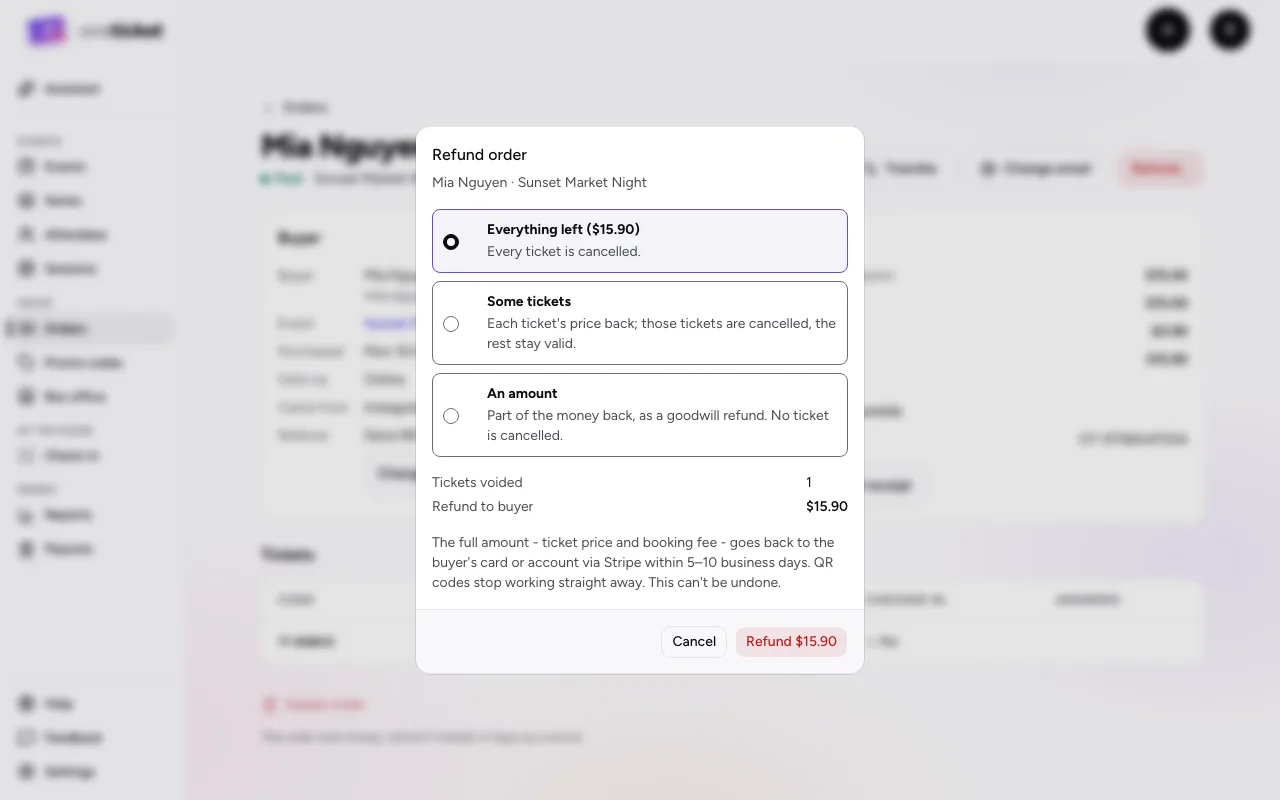
Refunds go back to the buyer's card through Stripe, usually within 5 to 10 business days. Refunded tickets' QR codes stop working straight away.
Refund a whole order
- Open the order (from Orders), or open its menu (⋮) on the list.
- Choose Refund order (in the menu, Refund).
- Check the amount: the full amount, ticket price and booking fee, goes back to the card.
- Choose Refund $X to confirm. This can't be undone.
For an order that wasn't paid online (a free booking, or cash at the door), no money moves: the tickets are cancelled. The button says Cancel tickets. A free order can also be deleted, which takes it off your lists and only emails the buyer if you ask.
Refund part of an order
- Open the order and choose Refund….
- Under What to refund, choose:
- Everything left: every ticket is cancelled.
- Some tickets (or Some tickets and extras): tick the tickets, and choose how many of each extra. Each one's price comes back; those tickets are cancelled and the rest stay valid.
- An amount: part of the money back, as a goodwill refund. No ticket is cancelled. Type the Amount to refund.
- Choose whether to Include the booking fee. Untick it to refund the price only. Once an order's first refund keeps or gives back the fee, later refunds on it do the same.
- Optionally add a Note. It goes in the buyer's email and the order's history.
- Choose Refund to confirm.
Refunding after the event? Its money may already have been paid out to your bank. The refund then comes out of your Stripe balance, and if that's short, Stripe takes the rest from your bank account: the refund dialog says so.
The order's page lists every refund under Refunds, and its status becomes Partly refunded or Refunded.
Refunding a cancelled event
If an event isn't going ahead, cancel it rather than refunding order by order: every card order is refunded in full, ticket price and booking fee, and everyone is emailed. Refunds Stripe refuses are listed on the event's page, where you can retry them or refund the order here. Then you can archive the event.
Still stuck? Contact support and a person will get back to you.