Share your event
Copy the link, post it to social media, print a QR code, and send people straight to checkout.
Once your event is published, share its link anywhere.
Copy the link
- On Events, choose the event to open its page in the app.
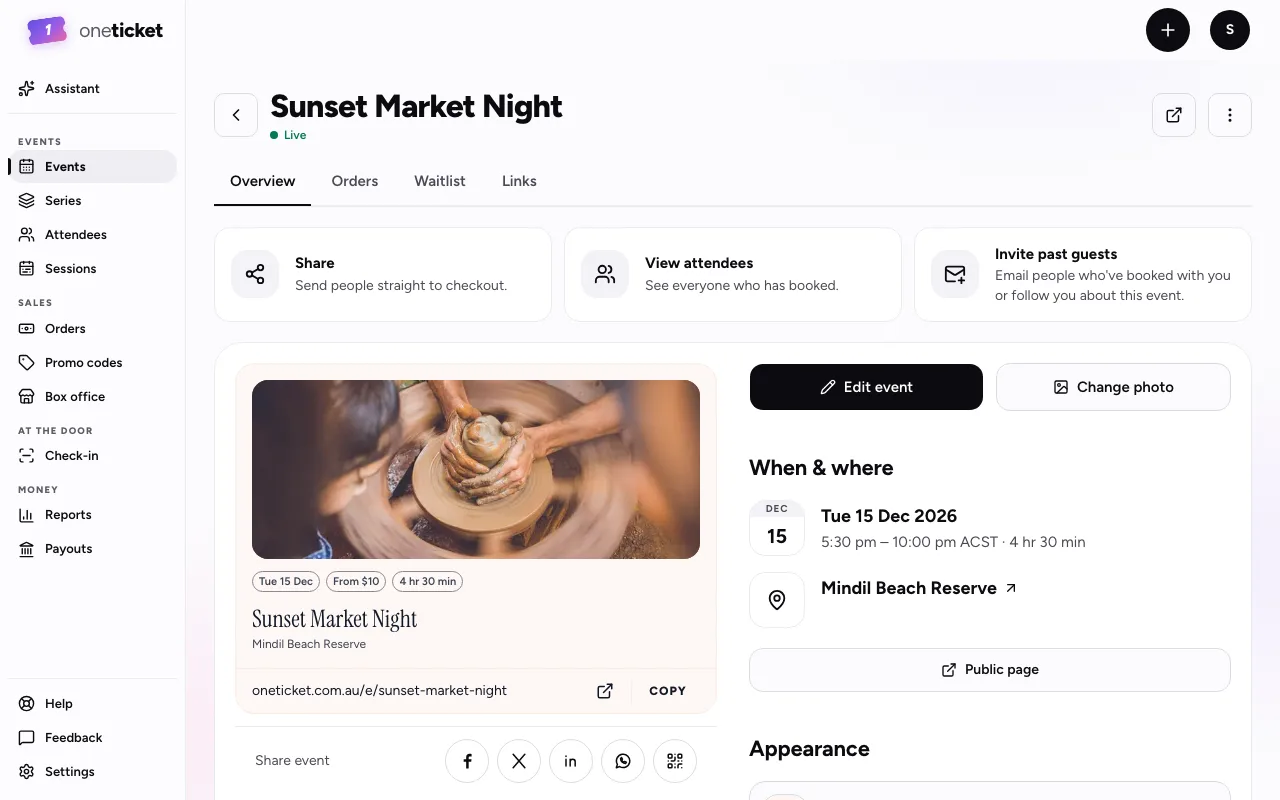
- Choose Share ("Send people straight to checkout") to copy the link. You'll see "Link copied".
The preview of your public page shows the link too: choose Copy beside it.
Post it
Under the preview, Share event has buttons for Facebook, X, LinkedIn and WhatsApp. Each opens in a new tab with the link ready to post. When the link is shared, it shows the event's title and cover.
Print a QR code
Put a QR code on a poster, a flyer or the door: a phone camera opens the event's page, where people book.
- Under the preview, in Share event, choose the QR code button (after WhatsApp).
- Choose Download PNG for a picture, or Download SVG for print, which stays sharp at any size.
A series has its own code: on the series' page in the app, choose ⋮ → QR code. Your organiser page has one too, under Settings, QR code (see Your organiser page).
Share all your events at once
Your organiser page lists every public event you have. Share its link in your bio or newsletter, and new events appear there automatically.
See how many opened it
Visitors counts the people who opened your event's page: on the event's page in the app, beside what has sold, and as a column on Events on a wider screen. Seen beside the tickets sold, it tells you whether a quiet event isn't being seen or isn't selling.
- Each browser counts once, however often it comes back. You and your team aren't counted, and neither are search engines, link previews or other bots.
- Only a published event counts visitors: a draft has none yet.
- Nothing about a visitor is kept: no name, email address or IP address, only a scrambled number that can't be traced back to them.
Track which posts sell
Give each post, promoter or rep its own link and see which brings the most sales. See Tracked links.
Still stuck? Contact support and a person will get back to you.