Absorb the booking fee
Buyers pay exactly your ticket price; the booking fee comes out of your payout instead.
Normally the buyer pays a small booking fee on top of your ticket price, and you receive the whole price. On any plan, Free included, you can absorb the fee instead: if you do, buyers pay exactly your ticket price, and the booking fee and card processing come out of your payout instead.
Turn it on
- Go to Get paid in the menu on the left.
- Under Absorb the booking fee, switch on Absorb the booking fee on my tickets.
- It saves as you switch it. New orders use it straight away.
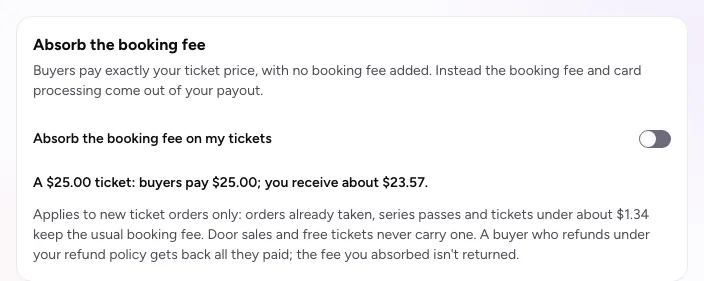
The card shows an example, such as "A $25.00 ticket: buyers pay $25.00; you receive about $23.57."
What it applies to
- New ticket orders only. Orders already taken keep the usual booking fee.
- Not series subscriptions, and not tickets under about $1.34, which keep the usual fee.
- Door sales and free tickets never carry a booking fee.
If a buyer refunds under your refund policy, they get back all they paid; the fee you absorbed isn't returned.
Only the owner can change this. See Fees for how the booking fee is worked out.
Still stuck? Contact support and a person will get back to you.