Audit log
See who refunded, transferred, checked in, undid or changed what on your organiser, and download the last 12 months as a spreadsheet.
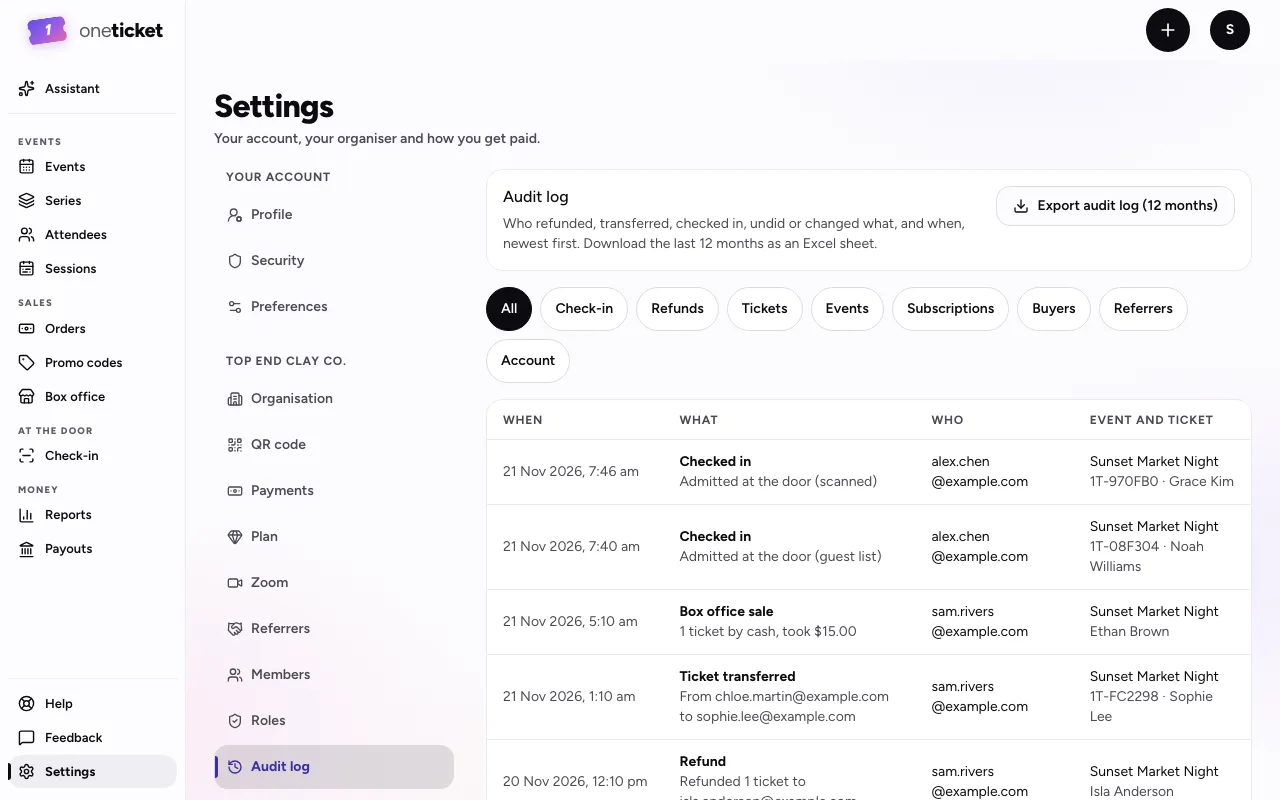
The audit log is a record of what happened on your organiser, newest first: refunds, transfers, deleted orders, check-ins and their undos, box office sales, cancelled and changed events, team notes, subscription changes, blocked buyers, messages to ticket holders, payment disputes, payouts that failed, and referrers added, changed or removed (and a ticket's referrer changed). Each entry says when, what, who did it and which event and ticket it was about.
Owners and admins can see it. Go to Settings, then Audit log.
Show one kind
The chips over the list show one kind at a time: Check-in, Refunds, Tickets, Events, Subscriptions, Buyers, Referrers or Account. Choose All to see everything again. The list shows 50 entries a page; use Next and Previous to move through it.
Download it
Choose Export audit log (12 months). You get a CSV of every entry from the last 12 months, which opens in Excel, Numbers or Google Sheets. Times are in your own time zone.
Still stuck? Contact support and a person will get back to you.