Connect Stripe to get paid
Paid tickets need a Stripe account. Ticket money goes straight into it: One Ticket never holds it.
One Ticket isn't a payment processor: Stripe is. You connect your own Stripe account, buyers pay into it, and Stripe pays your bank. Free tickets work without Stripe.
Connect your account
- Go to Get paid in the menu on the left (on a phone, More, then Get paid).
- Check your Currency first: it's fixed once Stripe is set up. See Choose your currency.
- Under Get paid isn't set up yet, choose Get paid (through Stripe).
- Stripe opens. Create or sign in to your Stripe account and answer its questions. It takes a couple of minutes.
- When Stripe sends you back, the card says You're connected and Getting paid. If it still says Get paid isn't finished, choose Finish setting up Get paid, or Refresh Stripe status if you've just finished.
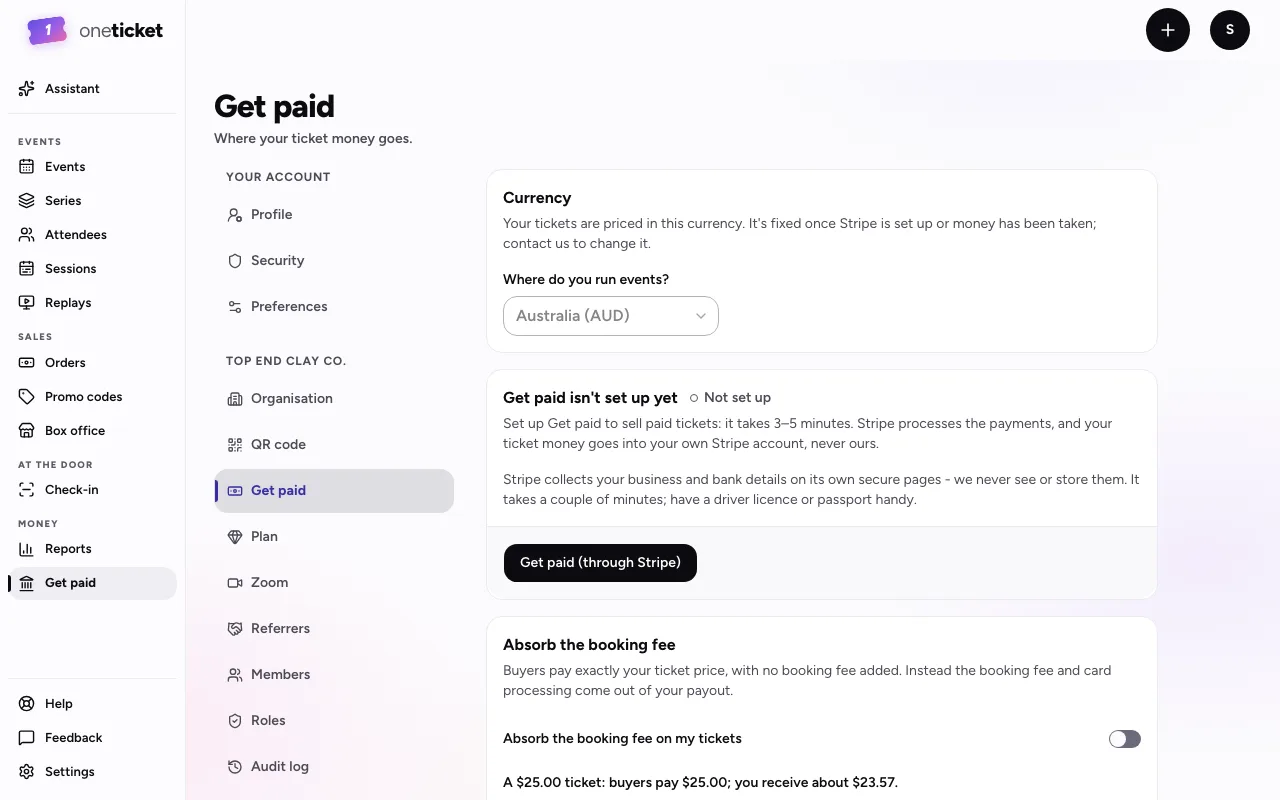
Only the organiser's owner can connect Stripe, finish it or refresh it. Admins see the card without its buttons. While you have paid tickets on sale, anyone who can't set it up sees a note on Events asking them to get an owner to finish setting up Get paid.
Until Stripe is connected
You can still publish, and free tickets can be booked straight away. Paid ticket types (pay what you want ones too) show on your event page marked Not on sale yet, with nothing to pick, and paid extras are left off. When every ticket type is paid, the page's button says Not on sale yet. Your own team sees a note on the page with a link to connect.
The event editor tells you too: under the page, "Set up Get paid to sell paid tickets: until then they show as not on sale yet", and pressing Publish asks Publish before you can get paid? first. Choose Set up Get paid to go there (your draft is kept, and Back to your event brings you back), or Publish anyway.
If someone comes to buy and can't, the organiser's owner gets an email ("Paid tickets to … aren't on sale yet"), at most once a day for each event, until Stripe is connected.
If Stripe pauses payments
Stripe can stop your account taking payments, usually because it needs more details or a document checked. Get paid then says Stripe has paused payments, the app shows a banner with Fix it in Get paid, and the owner is emailed. Until it's fixed, buyers see your paid tickets as temporarily unavailable; free tickets still work. Choose See what Stripe needs to fix it.
Disconnecting
Choose Disconnect on Get paid, then Disconnect Stripe. Paid tickets stop selling until you connect again. Past orders stay in Orders.
Next: When you get paid.
Still stuck? Contact support and a person will get back to you.