Delete an order
Remove a free booking or a comp, one at a time or several at once. Paid orders stay as a record.
You can delete an order that took no money: a free booking, a comp, or a box office sale where nothing was paid. That includes $0 orders brought over from the old site, even if they say Paid or Transferred. Orders are your financial records, so an order that took money (by card or cash) can't be deleted, and neither can one that has been refunded. To take a paid order's tickets back, refund it instead.
Delete one order
- On Orders, open the order's menu (⋮).
- Choose Delete, at the bottom of the menu.
- If you want the buyer to know, tick Tell them. They get a short email saying their booking was cancelled. Nobody is emailed unless you tick it.
- Choose Delete order to confirm. This can't be undone.
You can also delete it from the order's own page: Delete order is at the bottom. Once it's deleted you're taken back to Orders.
On an order that took money, Delete is greyed out and says "This order took money: refund it instead. It stays as a record". Refund is higher up in the same menu. A refunded order says "Refunded orders stay as a record", and a subscriber's ticket "A subscriber's ticket: manage it under Subscriptions".
Delete several at once
- On Orders, open the ⋯ menu at the top right and choose Select orders. Each order gets a box.
- Tick the orders to delete: press a row or its box. Select all ticks every order on the page (after any filter or search), and Clear unticks them.
- Choose Delete. One Ticket says how many will be deleted and how many paid orders stay, for example "3 will be deleted, 2 paid orders stay."
- Tick Tell them if each buyer should get the cancellation email, then choose Delete 3 orders (or however many) to confirm. Choose Done to stop selecting.
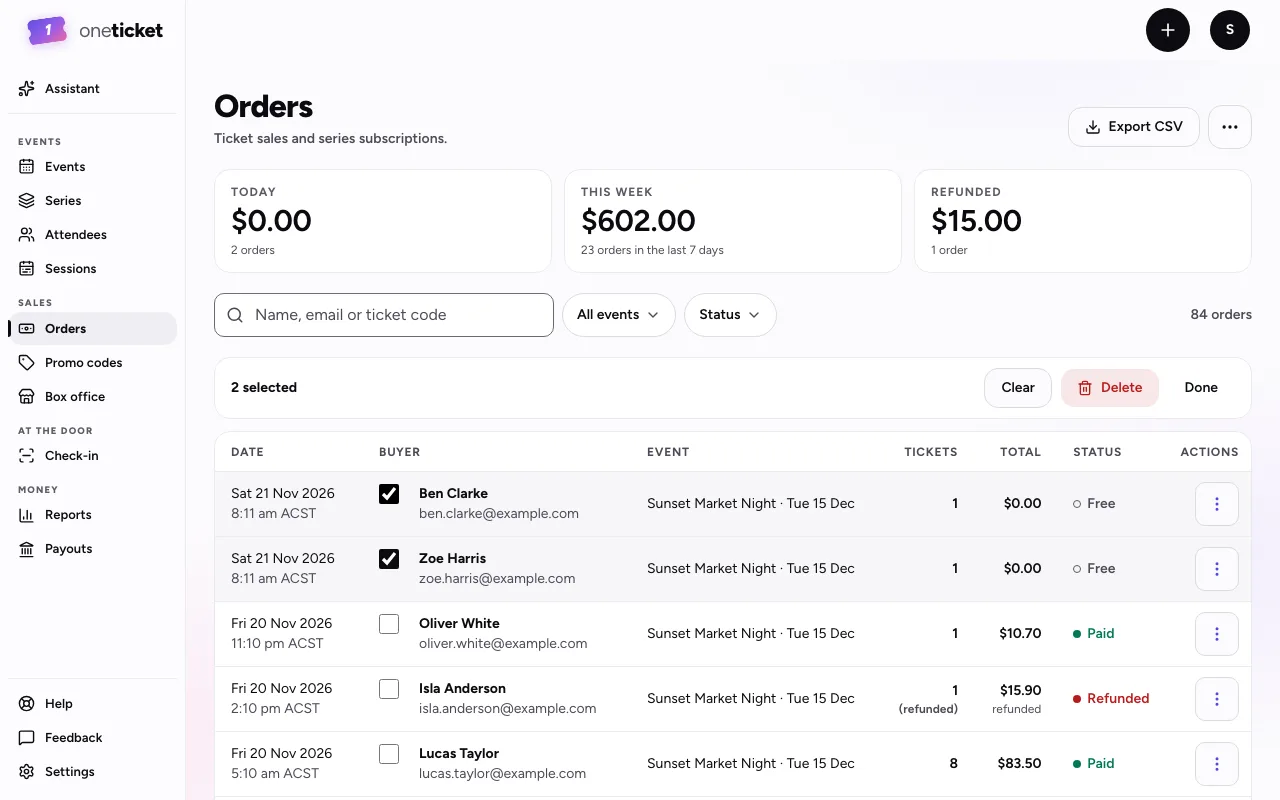
The same Select orders is in the ⋯ on an event's Orders tab.
If one of the orders you ticked is paid or refunded while you're choosing, it isn't deleted: it comes back on the list and One Ticket says so.
What deleting does
- The tickets stop working. Their QR codes are turned away at the door with "That order was cancelled."
- The places go back on sale. If the event has a waitlist, the next people on it are offered them. Any extras on the order go back in stock too.
- It leaves your lists. The order is no longer on Orders, Attendees, the door list, Reports or the export. To find it again, choose Cancelled in the Status filter on Orders.
- The audit log keeps a note. Your audit log has an Order deleted entry with who deleted it, when, the buyer's email and the ticket codes.
Only those who can refund orders (owners and admins) can delete them.
Still stuck? Contact support and a person will get back to you.