Email tickets and reminders
Send a buyer their tickets again or a reminder, or email everyone with a ticket to an event.
Send tickets again
A buyer can't find their ticket email?
- Find their order on Orders (search by name, email or ticket code).
- Open its menu (⋮) and choose Email ticket, or open the order and choose Email ticket.
Every ticket on the order is emailed to the addresses on it. On Attendees, a person's menu has Resend tickets, which does the same.
Send a reminder
Choose Remind in the order's menu or on its page. The buyer gets a reminder of the event, with their ticket.
One Ticket also sends automatic reminders the day before and the morning of each event, so you rarely need to.
Message ticket holders
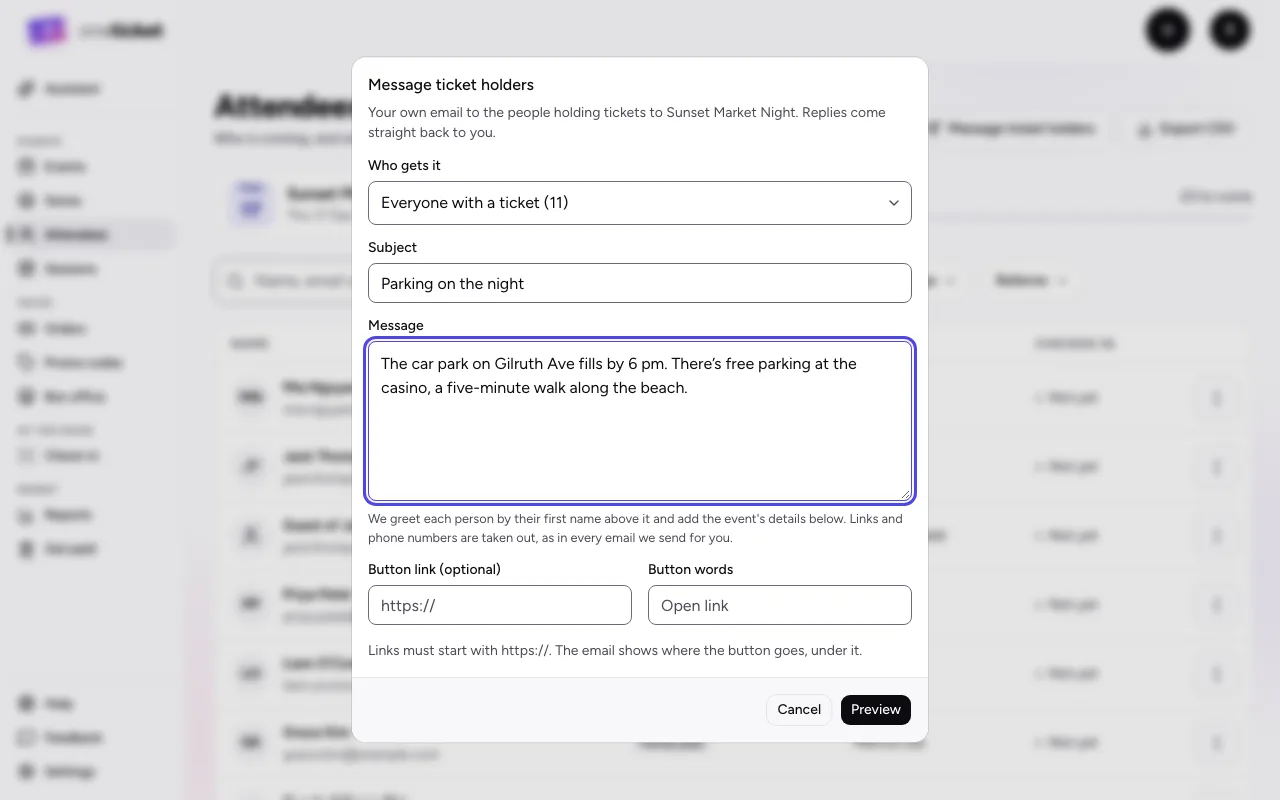
Write to everyone with a ticket to an event, such as when parking has moved. Replies come straight back to you.
- On Attendees, pick the event and choose Message ticket holders (on a phone, it's in the ⋯ menu). It's also in the event's ⋯ menu in the app.
- Under Who gets it, choose Everyone with a ticket, Checked in, Not checked in yet, or one Ticket type. For an online event, Joined or Didn't join.
- Type the Subject and Message. Each person is greeted by their first name, and the event's details are added below. Links and phone numbers are taken out of the message.
- Optionally add a Button link (starting with https://) and its Button words.
- Choose Preview to see the email as it arrives. Send a test to me sends it to you first.
- Choose Send to (the number of people).
Anyone whose address bounced, or who asked not to hear from you, isn't emailed. One message reaches 1,000 people at most: pick a ticket type and send in parts. Sent before lists the messages already sent for the event. Owners and admins can message ticket holders.
Limits
- The same email can be sent to an order up to 10 times a day, and not twice within a minute.
- An event that's over has nothing to remind them of.
- Emails count towards your plan's daily email limit.
- A message to ticket holders counts one email for each person it goes to.
Still stuck? Contact support and a person will get back to you.