Promo codes
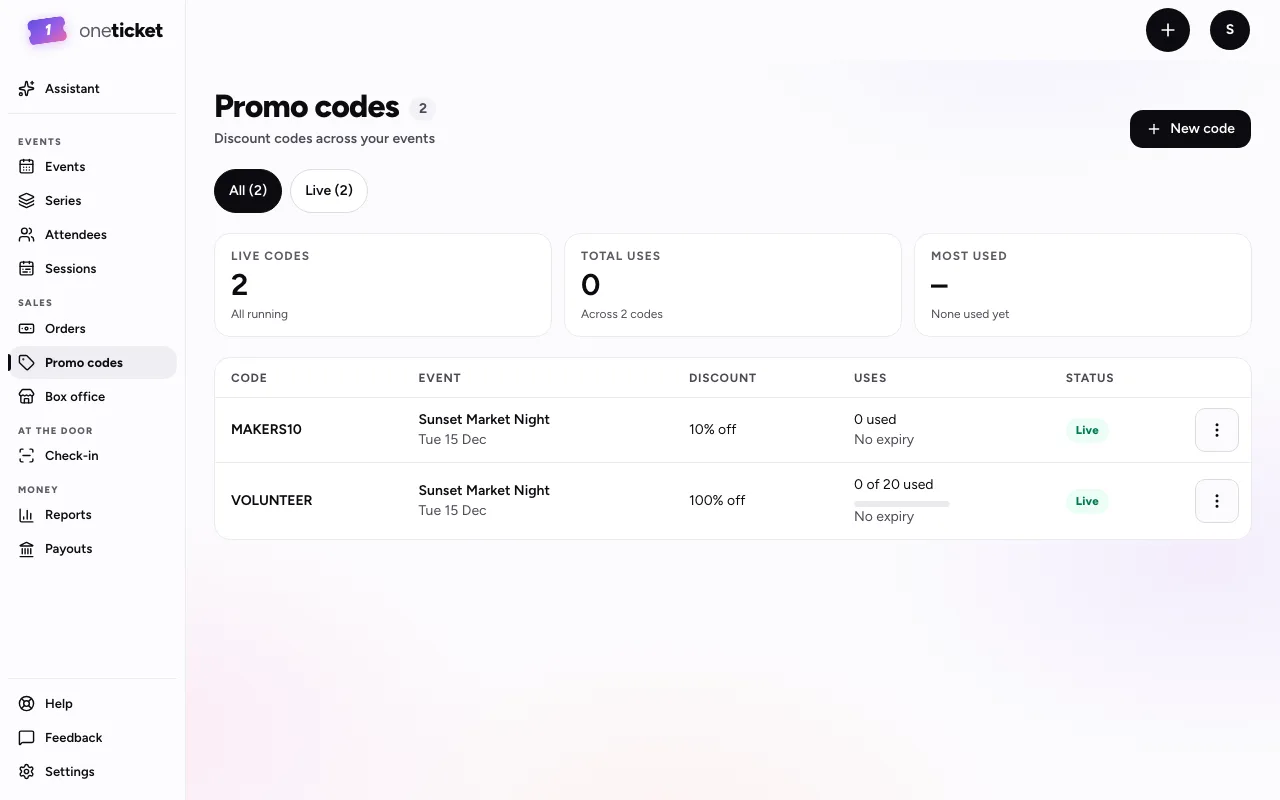
Discount codes buyers type at checkout: a percentage off, or an amount off the order.
A promo code takes money off the tickets and extras in an order, before the booking fee (never off an amount a buyer chose for a pay what you want ticket). Each code belongs to one event.
Make a code
- Choose Promo codes in the menu on the left.
- Choose New code.
- Pick the Event. A premiere played several times a day is listed by its day ("Webinar · Tue 3 Nov"), then its times ("9:00 am").
- Type the Code buyers will enter, such as MAKERS10.
- Choose the Type:
- Percent off: 1 to 100, off every ticket and extra in the order.
- Amount off the order: taken off the whole order once, not per ticket.
- Type the Amount.
- Optionally set Max uses (blank is unlimited) and a Last day. A code works until 11:59 pm that day, in the event's time zone.
- Choose Add code.
You can also add codes from the event itself: in the editor, choose 10 settings, then Promo codes. Save the event first; codes save as soon as you add them.
Turn a code off or delete it
Open the code's menu (⋮) and choose Turn off, Turn on or Delete. A code that has been used can only be turned off, so your orders keep their history.
An Every session code on a premiere played several times a day is one row, which says how many showings still to come have it. Turning it off or on does the same on every showing still to come. Deleting it takes it off every showing, past ones too; any that were used are turned off instead of deleted.
Good to know
- Codes don't apply to pay what you want tickets.
- To hide the "Enter code" box on the event page, turn on Hide the discount code box under Hidden on the page. Codes you've shared keep working.
- A code at 100% off makes the order free, which is handy for volunteers and guests.
Still stuck? Contact support and a person will get back to you.