Change the date or place
Move an event that people have booked: who is emailed, and their right to a refund.
You can change an event's date, start time or place at any time, even after people have booked.
Make the change
- Open the event in the editor: choose Edit event on its page in the app, or from its menu on Events.
- Change the date and time under When and where, or the place, and choose Save in the panel.
- Choose Save in the editor.
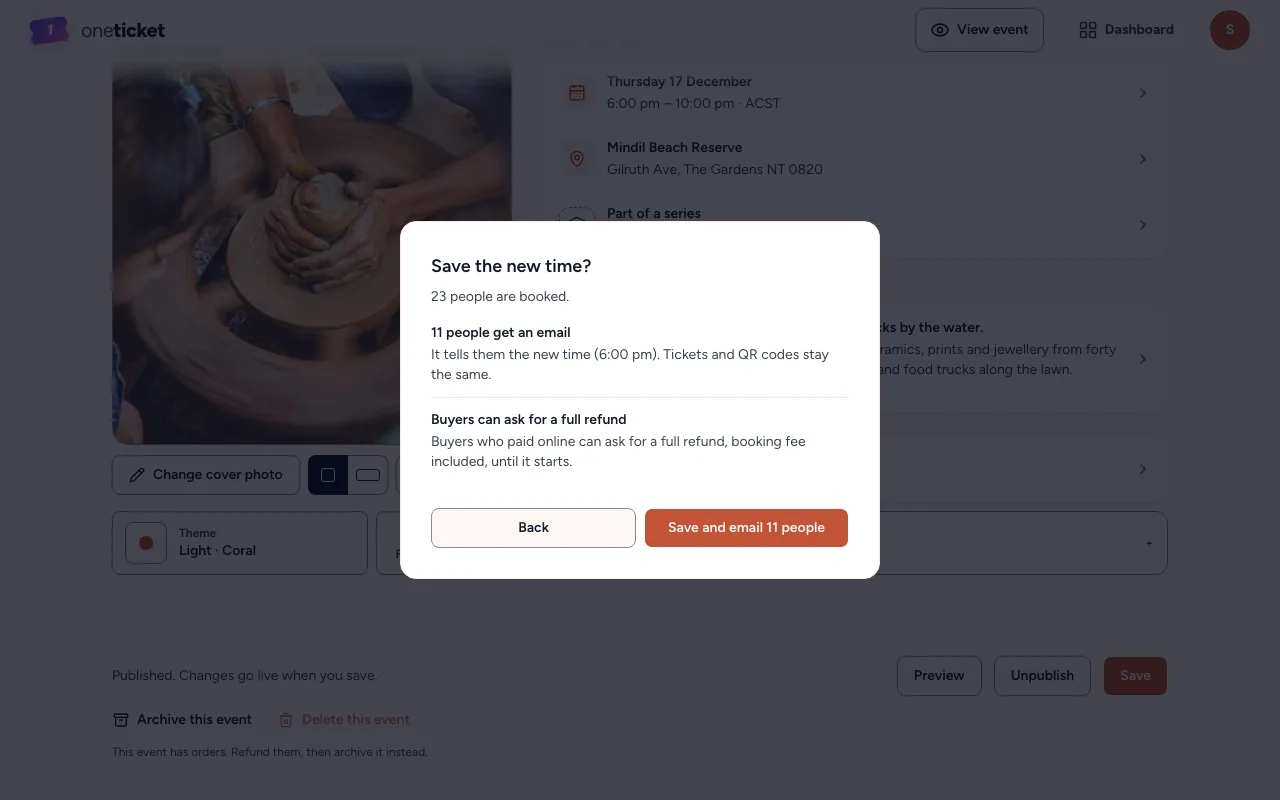
- If anyone is booked, One Ticket asks Save the new date? (or time, or place) and says how many people are booked and how many will be emailed: each buyer, and each guest who has an email address of their own.
- Choose Save and email N people.
What buyers get
- An email with the new details (guests with their own address get one too). Their tickets and QR codes stay the same, and their tickets show the change.
- The right to a full refund: buyers who paid online can refund in full, booking fee included, from their ticket until the event starts.
Cancelling instead
To call an event off, cancel it: everyone who paid online is refunded and everyone booked is told. See Cancel an event.
For a series, change many sessions at once with Edit all sessions.
Still stuck? Contact support and a person will get back to you.